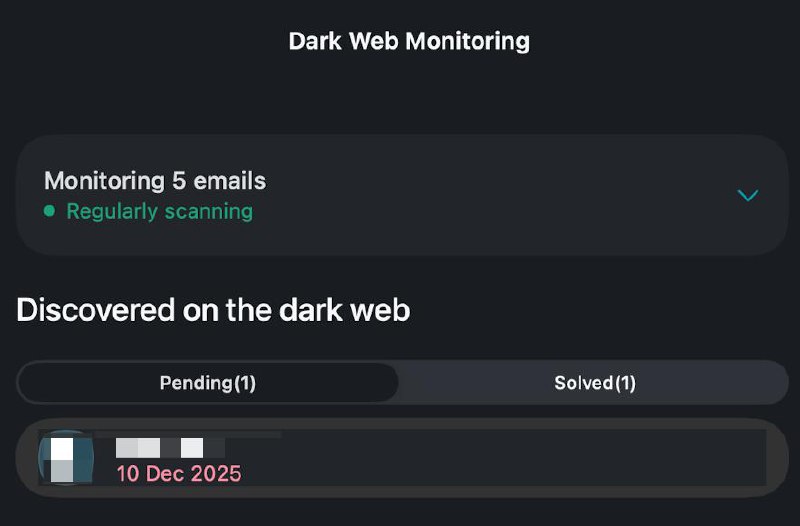
At the end of December I wrote (in Russian) that my data had surfaced on the dark web: email addresses, phone numbers, passwords. The leak came from an online school I studied at long ago.
The problem is that back then I signed up everywhere with my main email address and phone number.
That means a leaked “login + password” pair makes it easier to attack other accounts on the same address: even if the password is different, an attacker can hit “forgot password” and try to recover access.
There is also the risk of targeted phishing: instead of a generic “You have inherited a fortune from an African prince”, I get an email written specifically for me, enriched with details that make it more likely I fall for it.
Luckily, a couple of weeks earlier I had added a YubiKey hardware key to my key accounts, and without it nobody gets past two-factor authentication. What I saw as an experiment and overkill suddenly helped me keep access to my own data and devices.
There were no consequences, but the incident was unpleasant, so I decided to tighten the security of the mailboxes I use to sign in to services.
Proton Mail and SimpleLogin aliases
First, I moved my public email address from FastMail to a paid Proton account. What their mail offers: no ads, tracker removal, open source, encryption by default, protection against domain spoofing, signed outgoing mail and so on.
Next, I set up forwarding from my other addresses so I live in a single client.
Then the main step: I connected SimpleLogin to Proton. What it does:
- You have your base address, for example something@proton.me;
- In SimpleLogin you create aliases — separate addresses that forward mail to the main mailbox;
- Then you give an alias to a critical service as your new sign-in address.
An example:
- I have a main mailbox, master@gmail.com. I use it to sign in to iCloud, Gmail, crypto exchanges and so on;
- I create a new Proton address and set up forwarding from master@gmail.com;
- Then I create aliases for the Proton address — one per important service. For example, I used to sign in to iCloud with master@gmail.com, and now I use an alias like quiet.harbor.4821@simplelogin.com, while the main mailbox appears nowhere except as the password-recovery address;
- I repeat this for other important services: Cloudflare, Telegram, hosting providers and so on.
Why this helps: if one of my aliases leaks, attackers will find it harder to link it to my critical accounts — because every address is different. The Apple ID alias leaked? No big deal: that address is useless for attacking Gmail.
Yes, it’s a little fiddly, but I got an extra layer of protection:
- easier to locate a leak — you can see which alias was exposed;
- easier to cut the problem off — just switch the alias off;
- a smaller attack surface for key accounts.
Note: aliases don’t replace “Sign in with Apple/Google”. Sign in with Apple solves authentication (SSO): fewer passwords to remember, and you can hide your address. SimpleLogin aliases solve address isolation and leak and spam management: your accounts are less linked through a single email login. If one address leaks, it isn’t a “master key” to all the others, and you aren’t tied to one company — say, if you want to move from iOS to Android.
The main point: one email address for everything is a bad idea.
Passkeys, SSO and account recovery
1. I turn on passkeys wherever I can
A passkey is a relatively new way to sign in without a password: your device confirms the sign-in, with Face ID, Touch ID or a PIN. Why it’s good: a passkey can’t be leaked like a password, and it protects better against phishing — a fake site can’t use it.
2. I sign in with Apple or Google to services I use regularly but that aren’t critical
The idea is simple: instead of endlessly creating accounts with “email + password”, I use an existing, well-protected Apple, Google or Facebook account. Keep the downsides in mind:
- a single point of failure: lose access to your Apple ID or Google and your access to third-party services takes a hit;
- recovery needs much stronger protection: attacks often go through recovering an email, a phone number or a backup code;
- vendor lock-in: the accounts are built into the ecosystem, and moving becomes painful.
3. I keep recovery hygiene
- I keep backup codes somewhere safe;
- I keep a spare YubiKey hardware key somewhere safe;
- I protect the recovery address as strictly as the main account;
- I turn on sign-in and new-device notifications.
Optional but useful tools
Plus addressing
If your mail provider supports plus addressing, you can take your main address, say email@domain.com, and sign up to new services as email+shop@domain.com, email+trial@domain.com and so on. The mail lands in your main inbox, and if a leak happens you can see exactly where it came from. The downside: not every service accepts such addresses.
Disposable mail
I create addresses that live 10–30 minutes for one-off sign-ups: when I visit a dubious service, when I need to download a file or get a confirmation code once and forget it, when I don’t want to expose even an alias — or when I want a free trial one more time.
Don’t use it if you’ll need the account later: the address is destroyed after a few minutes and you lose access to the account for good. For the same reason, don’t use free online phone numbers to receive SMS codes when signing up.
Final checklist
- My main mailbox is separate and well protected, and nobody knows about it;
- I don’t expose my main address: for sign-ups I use aliases, Sign in with Apple/Google and temporary mail;
- I turn on 2FA wherever I can. In order of preference: a hardware key → an authenticator app → SMS as a last resort;
- I turn on passkeys wherever I can;
- Key accounts are protected by a hardware key. The backup key and backup codes are kept somewhere safe. There’s a note on “what to do if I lose my phone”;
- I use a password manager. Dashlane (my bonus subscriptions have run out, but I’ll keep recommending it) supports passkeys, hardware keys, breach monitoring and 2FA codes;
- I’ve turned on sign-in notifications where possible. I regularly review active sessions and “trusted devices”;
- After a leak I change passwords on critical services right away and clear out old sessions and devices.
First published in my Telegram channel (in Russian) on 11 and 17 January 2026: t.me/raschet7/259 and t.me/raschet7/260.